
Your MIS and your storefront should work as one.
Infigo connects directly to the MIS systems running your production floor. Orders flow in. Artwork transfers automatically. Status updates come back. No double-keying. No chasing jobs through spreadsheets.
The gap between taking an order and producing it costs you more than you think.
Most print operations still have a manual step sitting between their online storefront and their MIS. Someone logs in, re-enters the order, attaches the artwork, and updates the job status. Then does it again for the next order. And the one after that.
It’s not just slow. It’s a source of mistakes, reprints, and margin erosion — at exactly the point in your workflow where accuracy matters most.


Manual data entry
Every order re-keyed into your MIS is a chance for something to go wrong. Wrong quantity, wrong spec, wrong file. The error usually shows up on press.

Artwork that doesn't follow the order
Sending artwork separately from order data — by email, by folder, manually — introduces delays and mismatches. Production gets the wrong version, or nothing at all.

Disconnected job tracking
When your storefront and MIS don’t talk, your team becomes the middleware. Chasing status updates. Fielding customer calls. Doing work that should happen automatically.
How the Integration Works
End-to-end. Automatic. No middleware required.
Infigo’s MIS integrations are built natively into the platform. There’s no third-party connector to maintain, no custom API work to commission. You configure it once, map your products and variants, and the workflow runs itself.
Connect Link — Products, variants, attributes, and customers in Infigo are mapped to their counterparts in your MIS using Connect Link. Set it up once. It runs every time.
Native integrations with the MIS systems you already run.
Infigo has purpose-built plugins for the most widely used print MIS platforms. Each integration is configured directly inside Infigo — no middleware, no third-party connector.
No direct plugin for your MIS? Connect Flow can push order data as XML or JSON to any API endpoint, hot folder, or FTP location — including XSLT transformation to match the format your system expects.


PrintIQ
MIS / ERP

Tharstern
MIS / ERP

CERM
MIS / ERP

Veracore
MIS / Fulfilment

LabelTraxx
Label MIS
What The Integration Actually Handles.

Order + artwork transfer
Order data and print-ready artwork go to your MIS together, in one transaction. No separate upload step. No artwork sitting in someone’s inbox.

Entity mapping via Connect Link
Map Infigo products, variants, attributes, attribute combinations, and customers to their counterparts in your MIS. Once mapped, the link persists — every order references the correct MIS record automatically.

Webhook-based status sync
Job status updates from your MIS come back into Infigo automatically via webhook. Trigger customer notifications or update job views — without anyone manually checking two systems.

Conditional order release
Orders are only sent to the MIS when they’re actually ready: paid, approved, artwork finalised. No incomplete jobs landing in your production queue.

Two-way data flow
Some integrations support bidirectional sync. Products, pricing, stock levels, and customer data can flow from your MIS back into Infigo — keeping both systems in step without manual updates.

Multiple simultaneous integrations
Running more than one MIS, or routing different order types to different systems? Infigo supports multiple plugin connections running in parallel.
How print businesses use MegaEdit

Manual re-entry — gone.
Every hour your team spends re-keying orders into a MIS is an hour that could go elsewhere. Integration removes that step entirely, for every order, every time.

Fewer errors, fewer reprints.
Data that moves automatically doesn’t get mistyped, misread, or misrouted. The artwork that goes to production is the artwork the customer approved.

Real-time job visibility.
Production status is visible in Infigo’s Shared Print Operations view the moment it updates in your MIS. No refresh. No phone calls. No chasing.

Customers stay informed.
Status changes in your MIS can trigger automated customer notifications through Infigo. Customers get updates. Your team handles the exceptions, not the routine.

Scale without adding headcount.
Order volume grows. Manual admin doesn’t grow with it. An integrated workflow handles more throughput without requiring more people.

Confidence in your data.
One source of truth, flowing automatically between systems. Your MIS reflects what your storefront sold. Your storefront reflects what your MIS says.
How Print Businesses Use Infigo Integrations In Production.
MIS Integration Is One Part Of A Connected Platform.
Infigo connects your storefront to production systems, but also to shipping providers, payment processors, accounting software, CRM platforms, and ERP systems. Every connection removes a manual step from your operation.
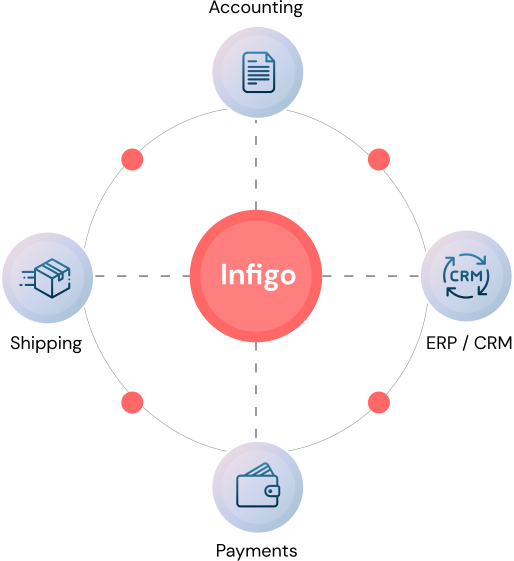

Shipping
FedEx, UPS, EasyPost and more — fulfilment status flows automatically.

Payments
Payment gateway integrations built in — no separate checkout engineering.

ERP / CRM
Connect to wider business systems through native integrations or Connect Flow.
Built To Be Configured, Not Custom-Coded.
MIS integrations are configured directly inside Infigo using credentials and Connect Link mappings. For the major MIS platforms, the plugin is already built — you’re completing a setup, not commissioning development.
For systems without a native plugin, Connect Flow outputs XML or JSON to any API endpoint, hot folder, or FTP location. If your MIS can receive structured data, Infigo can send it.